Contents
When Google indexes the wrong language, searching your own brand shows the English version or a help page instead of your homepage. Do not start by blaming the content. Check three settings first: the default language prefix, the x-default tag and geo-based redirection. Together they send Google to the wrong page consistently.
This pattern is common on multilingual sites. In most projects these settings are written once during setup and never revisited. A product selling into one market can easily keep an English default simply because the template shipped that way.
- The wrong language being indexed is usually caused by three technical settings, not your content.
- 1) the default language prefix, 2) the x-default tag, 3) geo-based redirection.
- Googlebot generally crawls from the US and sends no Accept-Language header; if a redirect does not account for that, it lands on one version every time.
- Fix all three together; fixing just one leaves the outcome unchanged.
- Verify with Search Console URL inspection, curl -A "Googlebot" and an x-default check.
When Google indexes the wrong language, which setting is the cause?
Each setting looks harmless alone. Combined, the site Google sees differs from the site your users see.
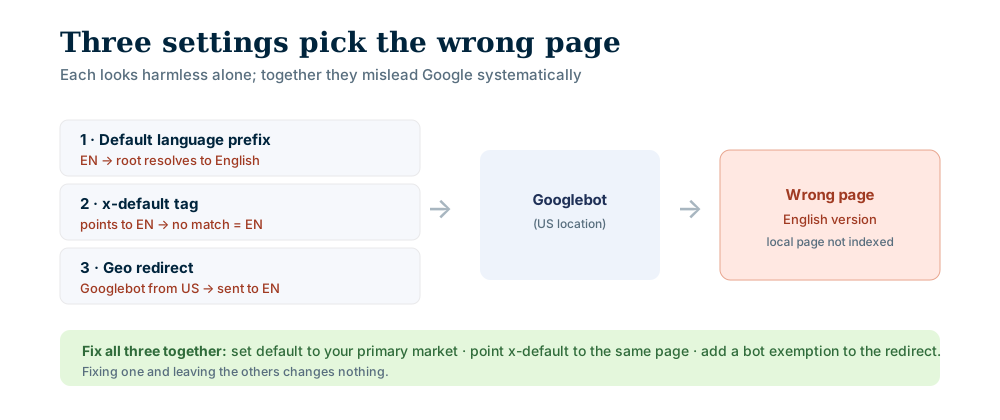
| Setting | Symptom | How to check | Fix |
|---|---|---|---|
| Default locale prefix | The root address redirects to English | Open the root in a private window | Point the default at your primary market |
| x-default annotation | Every unmatched case falls to English | Look for hreflang="x-default" in the page source | Point it at the default version |
| Geo-based redirection | Googlebot is sent to English on every visit | Read the response of curl -A "Googlebot" -I | Remove the automatic redirect, offer a language link |
1. The default locale prefix
Every site has a default: where does a request with no language go? If that value points at English, the root address redirects to the English version. Your local homepage is no longer reachable from the root; it is a subpage with its own address.
2. The x-default annotation
x-default marks the fallback page for when no language or region matches. Google describes it in its localized versions guide. Point it at English and the fallback is always English. Your local page can declare its own hreflang perfectly and the cluster still says "if nothing matches, go to English".
3. Geo-based redirection
Routing visitors by country feels friendly. But Google's guide to multi-regional sites advises avoiding automatic redirects. The same guide notes that Googlebot generally crawls from the US and does not send an Accept-Language header. If your rule does not account for that, the bot goes to English on every visit and your local page is never crawled, or is crawled and left unindexed.
What Do hreflang and x-default Actually Do?
hreflang tells Google which language and region versions of the same content exist. x-default is the fallback in that cluster. Three rules from Google's documentation matter:
- Tags must be reciprocal: if page A points to B, B must point back to A.
- Every page must list itself as well.
- Addresses must be fully qualified, starting with
https://.
One detail is easy to miss: Google determines a page's language with its own algorithm, not from hreflang or the HTML lang attribute. Writing lang="en" alone does not guarantee the page is indexed as English. The tags point Google at the right cluster; the content decides the language.
Why Is Google's Chosen Canonical Different From Yours?
Do not guess, measure. Three checks are enough.
First, Search Console's URL inspection tool. Inspect your local homepage. The tool shows "User-declared canonical" and "Google-selected canonical" side by side. If they differ, Google read your tag and chose another address.
Google's canonicalization documentation says the choice combines signals such as redirects, rel=canonical and sitemaps, with the sitemap being a weak signal. Strengthening the tag will not help; you need to find out why it was overruled.
Second, ask what the bot sees.
curl -A "Googlebot" -I https://yoursite.com/If the response redirects to the English version, the third problem is yours too. This test does not reproduce everything Googlebot does; it only shows how your rule reacts to the user agent name.
Third, check which address your x-default tag points at. It is a one-line check and often gives the answer directly.
Is Exempting Googlebot From the Redirect Cloaking?
It is a fair question, because older advice often says "exempt bots". The safer line is this: Google's cloaking policy defines cloaking as presenting different content to manipulate rankings and mislead users. Sending the bot to different content is exactly that risk.
So the recommendation is not to give the bot its own rule but to remove the rule for everyone:
- Remove the automatic redirect and offer visitors a language selector link. Google's multi-regional guide also recommends giving users a way to choose a language.
- Publish each language version at its own address and build the hreflang cluster reciprocally.
- Point the default prefix and x-default at your primary market.
- Show Googlebot and users the same content at the same address.
Trouble starts when a rule decides who sees which content. As long as the bot and the user see the same page, you are on safe ground.
Why Are Unused Locale Prefixes a Problem?
While you are there, check one more thing. Multilingual frameworks usually define more locales than you have actually translated. If untranslated prefixes return 200 in production, every page multiplies by the number of locales (example: ten prefixes defined, two real, and an eighty-page site becomes eight hundred addresses, most carrying the same content). Duplicates pull crawling away from the pages that matter and blur which address Google selects.
The fix is simple: permanently redirect unpublished locale prefixes to the default version, or switch them off and remove them from the hreflang cluster.
Once the fix is live, the job is done when "Google-selected canonical" in URL inspection returns your address. To manage multilingual SEO from one panel, explore AgentFabrica's features, see how the platform fits small and mid-sized businesses, or check pricing.
Bring content, scheduling and replies into one panel. Start with a free account; scheduling and images come with paid plans.