Contents
An attribution window is the period after an ad interaction during which a conversion can still be credited to that ad, for example 1 day or 7 days. A longer window reports more conversions even when real sales stay the same. That is why two dashboards often disagree because of window settings, not because one ad performed better.
- An attribution window is the time after an ad interaction in which a conversion still counts (e.g. 1 day, 7 days).
- The window you choose changes the reported conversion count, even when real sales are identical.
- Platforms ship different defaults: Google Ads uses 30 days for click-through conversions, Adjust uses 7 days for clicks and 24 hours for views.
- View-through conversions can overstate impact in sales-focused campaigns.
- Fix: one consistent model and window across every channel, with unified measurement in one place.
What is an attribution window?
It is the time between an ad interaction and the conversion it can be credited with. A 7-day click window credits a purchase made up to 7 days after the click. Google Ads describes a conversion window as the period after an ad interaction in which a conversion is recorded (Google Ads Help).
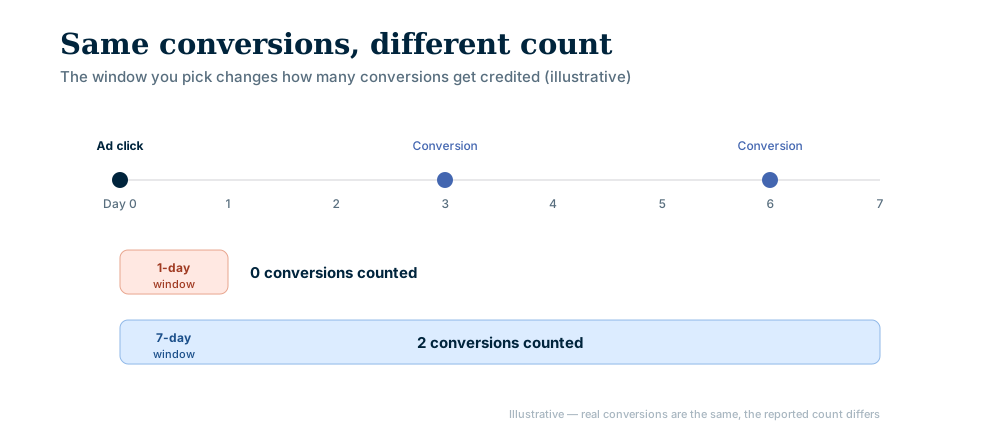
Windows shape both the reports you read and the signals platforms optimize on. A wrong choice can push budget to the wrong channel.
What is the difference between 1-day and 7-day attribution?
A 1-day window credits conversions that happen within 24 hours of the interaction. A 7-day window extends this to a full week. The longer window captures delayed purchases, but it also loosens the link between the ad and the sale.
| Feature | 1-day attribution | 7-day attribution |
|---|---|---|
| Conversion count | Lower, reflects immediate impact | Higher, captures delayed conversions |
| Directness | Stronger link to the interaction | Weaker, broader influence |
| Fits best | Quick decision cycles | Longer consideration phases |
| ROAS | Lower, closer to direct return | Higher, may overstate direct impact |
Why do platforms disagree?
Each platform sets its own default, so two dashboards rarely match even if you change nothing.
| Source | Default | Notes |
|---|---|---|
| Google Ads (click-through conversions) | 30 days | Adjustable from 1 to 90 days, depending on the conversion source |
| Adjust (click) | 7 days | Default for device matching |
| Adjust (view) | 24 hours | Default for device matching |
Values come from the Google Ads and Adjust help pages. We could not open an official Meta page stating its default, so check the setting inside your own ad account.
View-through optimism and internal disagreement
Marketing teams may prefer a 7-day window because it shows more conversions, while finance may prefer 1 day for a more tangible return. Add platform-specific reporting and the discrepancies grow.
Counting the same sale in several places can also inflate totals, so your conversion count may be tripled without anyone noticing.
How do you set a consistent attribution window?
Standardize the window you use to compare channels, even if campaign types differ. The steps:
- 1Define your goal: Immediate sales or long-term brand building?
- 2Audit current settings: List the default window on every ad platform.
- 3Align internally: Agree on one primary model and window across marketing, sales and finance.
- 4Implement uniformly: Adjust platform settings where possible, or normalize data in one analytics platform.
- 5Document it: Make sure everyone knows the chosen model and its limits.
one window, one source of truth
The aim is an accurate picture of marketing impact, not the highest number. Pick one window, apply it everywhere and read click-through and view-through conversions separately. To centralize that measurement, explore the AgentFabrica features, compare plans on the pricing page or reach us through the contact page.
Bring content, scheduling and replies into one panel. Start with a free account; scheduling and images come with paid plans.