Contents
Meta clicks vs link clicks: Clicks (All) counts every interaction with your ad, including profile taps, likes, comments and expanding an image to full screen. Link clicks count only clicks that lead to a chosen destination, such as your website. Judge traffic and sales by link clicks; Clicks (All) usually looks better than the traffic you actually got.
Meta's developer announcement defines the clicks field as the total number of clicks on your ad, and says it can include page likes, post comments and event responses next to link clicks. Clicks to your site live in a separate field, inline_link_clicks. Sources: Meta developer announcement and the Insights API reference.
- Meta's "Clicks (All)" column counts every interaction, not visits to your site.
- Clicks to your site sit in the
inline_link_clicksfield; decide on that one. - Profile visits, likes, comments and image expands inflate the click count.
- On a conversion campaign, reading "Clicks (All)" sends you looking for the problem on the landing page, which is the wrong place.
- To see where the funnel breaks, read the whole chain, not a single rate.
Meta Clicks vs Link Clicks: What Is the Difference?
Three metrics get mixed up all the time. Here is what each one counts and what to use it for:
| Metric | What it counts | Use it for |
|---|---|---|
| Clicks (All) | Link clicks, likes, comments, profile taps and similar interactions | Engagement level |
| Link clicks | Clicks to a chosen destination | Traffic and sales decisions |
| Landing page views | Visits where the page actually loaded after the click | Finding the loss between click and visit |
One small extra: inline_link_clicks uses a fixed 1-day click window, as stated in the Insights reference. Changing your report's attribution window does not change that field's window. We cover the window difference in our attribution window post.
When Does Clicks (All) Get Inflated?
Engagement clicks are not bad; on an awareness goal, likes and comments mean something. But on a sales or lead campaign they blur the decision metric. The gap opens up most in three situations:
- 1The creative carries a lot of text. People tap the image to read it. That counts as an interaction, and nobody goes to your site.
- 2You use video or a large image. Expanding to full screen counts inside Clicks (All) according to independent write-ups such as Jon Loomer's.
- 3Your brand is already known. People tap the profile name instead of the link and browse the page. It is a good sign, but it is not a step in your sales funnel.
None of these says your ad is bad. They only make the default click column unusable for decisions.
Same Ad, Two Different Stories
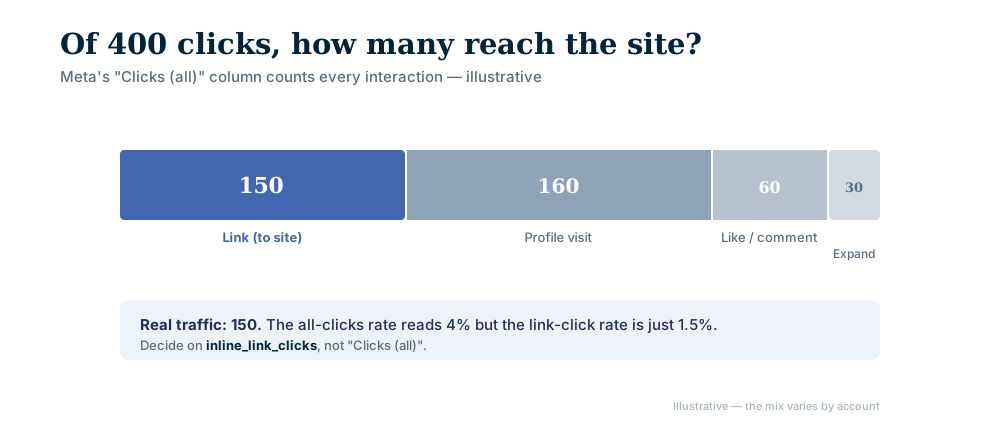
An illustrative example: your ad was shown to 10,000 people and the clicks column in the interface says 400. That is a 4% click rate, a good number. Now look at how those 400 clicks break down:
| Interaction | Count | Goes to your site? |
|---|---|---|
| Link clicks | 150 | Yes |
| Profile visits | 160 | No |
| Likes and comments | 60 | No |
| Image expands | 30 | No |
| Total (Clicks All) | 400 | Only 150 |
Real traffic to your site is 150, and the link click rate drops to 1.5%.
- The wrong reading. "Click rate is 4%, so the copy and image work. Traffic is there and conversions are not, so the problem is the landing page." On that reading you spend weeks editing the page, changing the headline and shortening the form. None of it helps, because the problem was never there.
- The right reading. "Link click rate is 1.5%. People see the ad, like it, even comment, but do not click. The problem is not the page, it is the promise the ad makes."
The Right Columns in Ads Manager
Do not leave the columns on the default layout. Customize them and add:
- Link clicks
- Link click-through rate
- Landing page views
The third is the column most people skip. Do not use the default "Clicks (All)" column for decisions on conversion campaigns. On an awareness campaign you can look at it, because interest is what you are measuring there anyway.
Why Do Link Clicks and Landing Page Views Differ?
Put the two columns side by side and most accounts show a gap: say 150 link clicks and 95 landing page views. The 55 people in between clicked but never saw the page. The usual causes are technical:
- The page loads slowly on mobile data and people go back before it opens.
- The link goes through a redirect, and every redirect adds another wait.
- The page opens badly inside an in-app browser.
- The tracking code fires late and misses people who leave early.
If this gap is large, stop tuning the ad and measure the page itself. The ad did its job and brought the person.
If You Build Reporting, Keep the Split in Code
If you write your own dashboard or reporting system, this split is a data decision, not an interface preference. For that reason AgentFabrica's funnel measurement never reads the clicks field; the step calculation uses only inline_link_clicks.
The reason: if the first step of the funnel is measured too broadly, the conversion rate into the next step looks lower than it is, and the diagnosis engine looks for the break in the wrong place. One field choice shifts every recommendation the engine gives. The same discipline applies to sales counts; a conversion count that may be tripled is another face of the same problem.
Read the Chain Step by Step
A single click rate says little on its own, even when it is measured correctly. To see where the break is, you need the whole chain: impressions, 3-second views, link clicks, landing page views, add to cart or form open, checkout start or form submit, sale. The ratio of each step to the previous one tells you which stage has the problem:
- Impressions to views drop: the creative does not hold in the first second; work on the edit and the first frame.
- Views are fine, link clicks are low: there is interest but no reason to act; work on the promise and the call to action.
- Clicks are fine, page views are low: a technical issue; work on speed and redirects.
- Page views are fine, cart is low: the page does not match the ad's promise, or the price is a surprise.
- Cart is fine, checkout is low: something surprises people at the last step, often shipping cost or forced sign-up.
clicks and inline_link_clicks?clicks can include likes and comments; inline_link_clicks counts link clicks only. Decide on the second.Read with the right metric, this chain tells you the next step by itself. Read with the wrong one, it points to the wrong step and costs you weeks. To see which sales number is real, read high ROAS but no profit; for funnel measurement in one panel, see conversion tracking. To apply this to your own account, check the pricing or write to us.
Bring content, scheduling and replies into one panel. Start with a free account; scheduling and images come with paid plans.