Contents
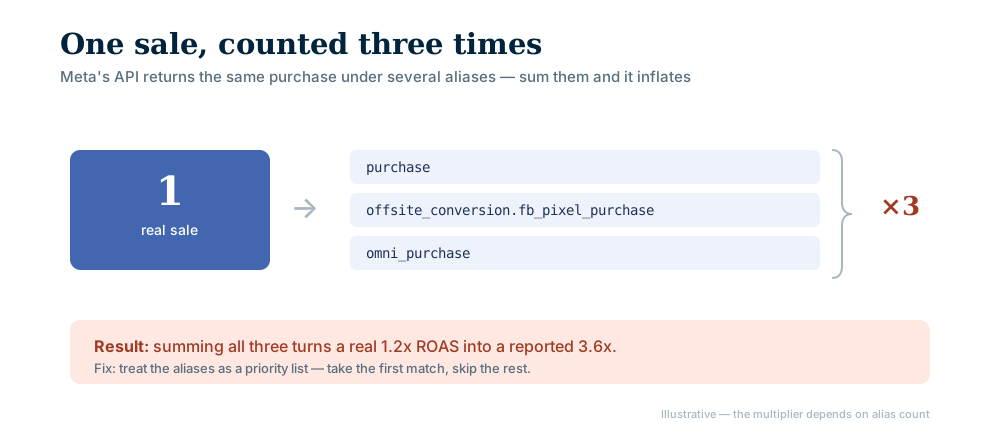
Meta ads duplicate conversions happen when one purchase comes back from the Marketing API under several event names and your report adds them up. In our own integration a single sale arrived as three rows, so a summing report counted it three times and inflated revenue and ROAS to match. The fix is to treat the names as a priority list and take the first match.
In our own integration, one purchase arrived in the response under these three names:
purchaseoffsite_conversion.fb_pixel_purchaseomni_purchase
All three described the same sale. We found no official explanation of why Meta returns them together, so we do not state a reason. What we can confirm is that the standard purchase event appears in the actions and action_values arrays as offsite_conversion.fb_pixel_purchase (Meta Pixel conversion tracking documentation).
Write the reporting the intuitive way, match all of those names and add up their values, and one sale counts three times. The action_values array carries the same names, so revenue inflates by the same factor.
- In our integration one purchase came back under three names (purchase, offsite_conversion.fb_pixel_purchase, omni_purchase).
- Sum them and a single sale is counted three times; revenue and ROAS inflate the same way.
- The bug is silent: nothing breaks, the number just reads high, so it can survive for months.
- The fix: treat the names as a priority list, take the first match, skip the rest.
- Check: compare your count with the platform's own UI at the same date, account and window.
Why Do Meta Ads Duplicate Conversions Happen?
The mechanism is simple. If the response carries three rows for one sale and the code treats every row as a purchase, each sale is counted three times:
| How the report reads the response | Real sales | Reported |
|---|---|---|
| Takes the first match | 100 | 100 |
| Sums all three names | 100 | 300 |
| Reads one name, others missing | 100 | Possibly below the real figure |
Why Does Nobody Notice?
The bug is silent. Nothing crashes, no warning appears, nothing lands in the logs. The number is simply high.
And a high number rarely bothers anyone, because it points the way everyone hoped it would. A bug that produced a low number would be caught on the first day. One that produces a high number can live for months.
What Does It Cost?
In return-on-ad-spend terms: a real figure of 1.2 reports as 3.6.
Every decision built on that number rests on nothing:
- A campaign losing money looks profitable, gets more budget, and loses more.
- A genuinely good campaign looks weak next to the inflated one and gets paused.
- Channel comparison breaks down. Whichever channel carries the bug always wins.
If you report to clients, the damage runs deeper than a bad decision. A wrong decision can be reversed. A wrong number you presented becomes a question of trust. We cover why a high ROAS can still mean no profit in high ROAS but no profit.
How Do You Handle It Correctly?
The rule is simple. Names that describe the same conversion are a priority list, not a sum. Take the value of the first name that matches, then stop.
// Wrong: summed, so one sale counts three times
total = purchase + offsite_conversion.fb_pixel_purchase + omni_purchase
// Right: first match wins, loop ends there
for (const name of ["purchase", "offsite_conversion.fb_pixel_purchase", "omni_purchase"]) {
  if (map[name] != null) return map[name];
}
return 0;
Order is a decision, but not one to guess. Compare each name's value with the sales count in Ads Manager for your own account, and put the name that matches your real sales first. We could not confirm in official documentation what scope each name carries, so that test has to run on your own data. The same discipline applies to lead and messaging events, which can also arrive under more than one name.
How Can You Check Your Own Conversion Count?
Put the sales figure from Ads Manager next to the figure your dashboard reports. Three things must match: date range, account and attribution window (see our attribution window post for the window difference). Then look at the shape of the difference:
- A clean multiple (exactly two times, exactly three times) points at name summing. This bug always produces a consistent factor, because every sale arrives under the same number of names.
- Variable drift usually points at the attribution window or a timezone difference. If the ad account's timezone differs from your report's, day boundaries shift.
- Your number lower than theirs usually means an event never matches at all, and your name list is incomplete.
The Wider Lesson: The Silent Class of Data Bug
This bug existed in our system and was fixed. That is why the post exists.
Most software bugs announce themselves. A page fails to load, a request errors, something lands in the logs. Bugs in the measurement layer do not behave that way. The output looks plausible, nobody complains, and the error goes on living inside the data.
Measurement code therefore needs a different kind of review. The only reliable check is comparison against a known external truth: the platform's own interface, the payment provider's order count, the accounting record. A report that is internally consistent has not shown you that it is correct.
AgentFabrica treats this split as a data decision; see conversion tracking for unified reporting. For the click-side version of the same trap, read why the Meta click metric flatters your ads. To apply this to your own account, check the pricing or write to us.
Bring content, scheduling and replies into one panel. Start with a free account; scheduling and images come with paid plans.